Popular questions · Live rooms
How live audio rooms actually work.
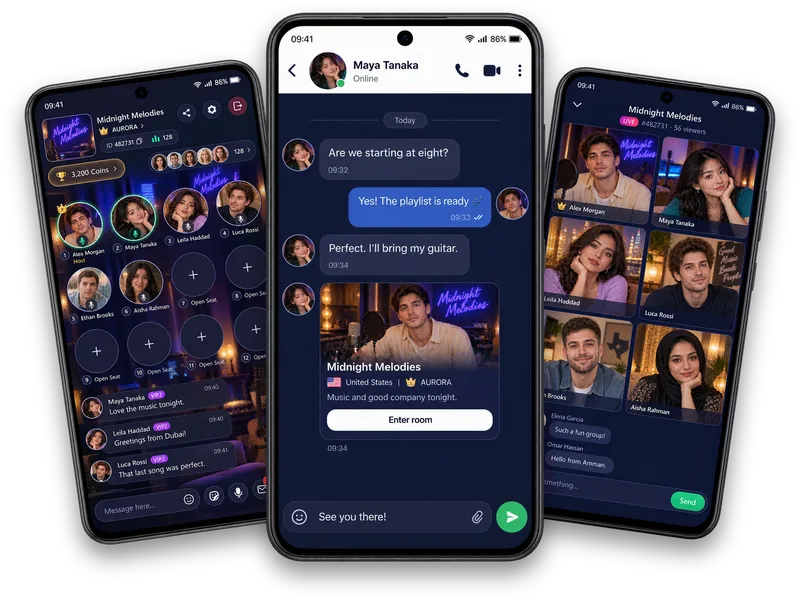
Seats, listeners, room chat and music broadcasting — here is a plain-language walkthrough of what is actually happening inside a Vozzo audio room.
There are two ways to be in a room: on a seat, or listening.
A live audio room has a small number of open seats for people who are actively speaking, and an audience of listeners within the current room capacity who are just there for the conversation. Joining a room by default makes you a listener — nobody hears you until you take a seat.
Taking a seat is optional and reversible. You can join one when a topic pulls you in, and step back to listening whenever you want to stop talking without leaving the room entirely.
Room chat runs alongside the voices, not instead of them.
Text chat sits next to the audio the whole time, so listeners who aren’t ready to speak can still react, ask a question or add a thought. A host who is paying attention will often read chat out loud, which is usually how a listener ends up invited onto a seat.
Emoji and quick reactions in chat are a lower-pressure way to signal you’re enjoying the room than unmuting to say so.
Music broadcasting is a host feature, not a free-for-all.
When a room includes music, it is the host selecting and controlling what plays — participants don’t queue their own tracks. The room’s listening controls let you adjust what you hear on your end without affecting anyone else in the room.
A room doesn’t need music to work. Plenty of good rooms run on conversation alone; broadcasting is one option among several, not a requirement.
Written by the Vozzo editorial team. Spotted a mistake or want to suggest a correction? Email support@vozzo.org.
Keep reading

Popular questions · Coins and Diamonds
What are Coins and Diamonds?
Short answer: Coins and Diamonds are virtual units that exist only inside Vozzo. Coins are what you use. Diamonds are what a host collects from gifts. Neither is money.
Popular questions · Hosting
How to start a live room on Vozzo
Starting a live room takes two steps: create the room, then choose how to go live. Some preparation comes first, because hosting has requirements.