Popular questions · Hosting
How to start a live room on Vozzo
Starting a live room takes two steps: create the room, then choose how to go live. Some preparation comes first, because hosting has requirements.
Before you start
Hosting has prerequisites. The app checks face authentication, a live cover and the required Wealth level before an application can be submitted. Having a profile and verification set up early saves time. Acceptance is not automatic.
See Getting started for sign-in and verification, and the Hosts page for what to expect.
Step 1: create the room
A room has a cover, a name, a country and a default mode. These set the identity of a place your community can come back to. Country messaging and validation follow the rules in the app.
A room you have created is separate from a live session. You can edit the room details before you go live.
Step 2: choose how to go live
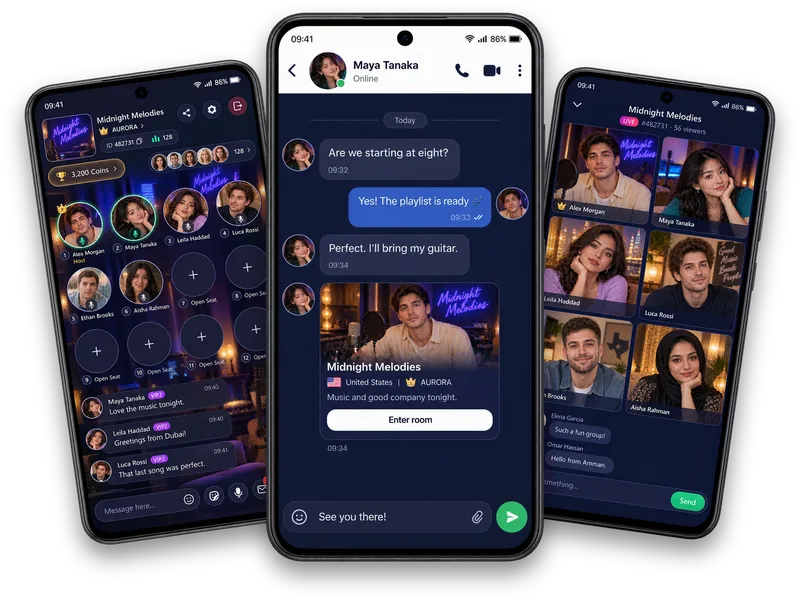
The start screen shows the room identity, an option to edit it and three modes: Audio Room, Solo Live and Party Live. Audio Room is voice with shared seats, Solo Live is you on screen with viewers, and Party Live brings several people into a shared live room.
Eligibility and host and guest limits apply. Pick the mode that suits what you want to do, then press Go Live.
Once you are live
Welcome people as they arrive, say the topic out loud and keep the conversation respectful. If you are new, our guide to your first live room has opening questions that work well.
Sources
Questions, answered
Do I need to be verified to host?
The app checks face authentication, a live cover and the required Wealth level before a hosting application can be submitted. Acceptance is not automatic.
Which room mode should I choose first?
Audio Room is the simplest: voice only, with shared seats. Solo Live and Party Live add video and more people.
Written by the Vozzo editorial team. Spotted a mistake or want to suggest a correction? Email support@vozzo.org.
Keep reading
Discover · Live rooms
Welcome listeners to your first audio room.
Welcome new audio-room listeners with a clear topic, a short introduction and an easy question. Check your sound, explain how to join in and leave people free to listen before speaking.
Popular questions · Hosting
How to host a live audio room, step by step.
To host a live audio room, check your eligibility and setup, choose a topic and prepare a simple opening. Welcome listeners, explain the room controls and leave space for people to join the conversation.