Write a post. Tag your people.
Share a small win, a big thought or a question for your friends. Use @mentions to tag someone and give them a place in the conversation.
Moments and Shorts on Vozzo
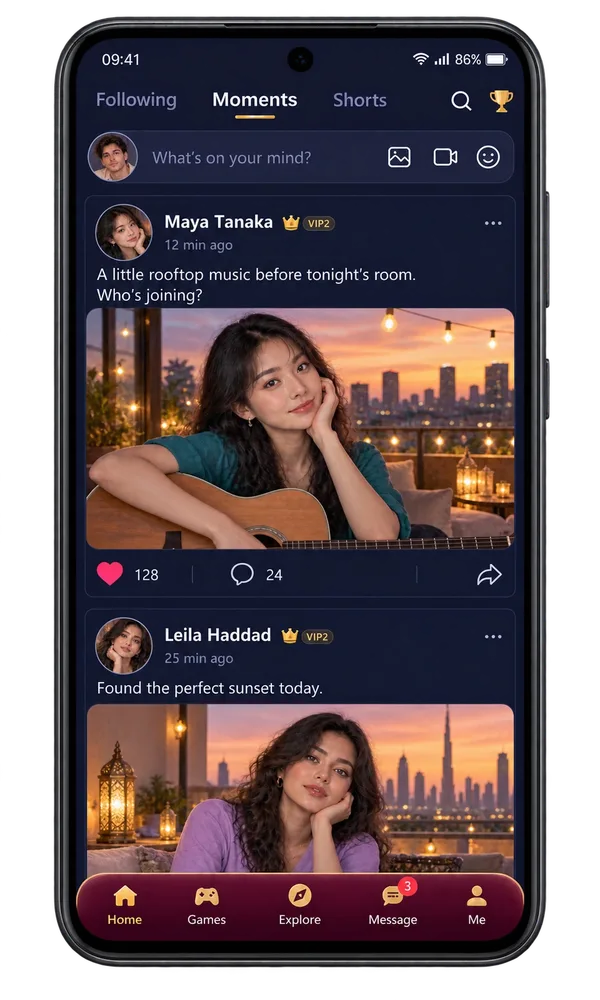
Moments is the Vozzo social feed for text posts, friend tags and photos with captions. Upload a video through the composer to share in Shorts, then discover community videos in an immersive feed with likes, comments and sharing.
Moments and Shorts
Share a small win, a big thought or a question for your friends. Use @mentions to tag someone and give them a place in the conversation.
Upload a photo and add a caption that tells the story. Let friends respond with likes, comments and replies, and keep your shared Moments on your profile.
Choose a video through the post composer, add your words and share it in Shorts. A creative clip, a favourite view or a little everyday joy can introduce people to you.
Make it your experience
Following keeps familiar people close, Moments gives your everyday a home and Shorts opens the door to new creators. Share what feels like you, respond to your friends and let a shared interest become your next hello.
Shorts: discover something unexpected
Step into an immersive short-video feed filled with community voices, creativity and everyday discoveries. A shuffled mix helps you find people beyond the accounts you already follow.
Full-screen videos, nearby-video preloading and focused playback are designed to keep discovery flowing. Pause, seek or adjust the volume while you watch.
Like a video, add a comment, share a Short or explore the creator behind it. Turn a quick watch into a shared laugh or a new connection.
Enjoy a changing mix of Shorts, then move to Following to catch up with people you know. Your feed has room for both discovery and connection.
Protection behind the experience
Vozzo combines account checks, video upload validation, blocked-account filtering and community moderation. These layers support a more respectful space for watching, posting and connecting.
Video uploads are checked for supported files, size and duration, then processed before they become available in the feed.
Review your profile and privacy settings, use blocked-account controls and choose carefully what you share. Ask before posting someone else’s image or private conversation.
Need help with harmful content or a community concern? Contact support@vozzo.org with the details so the team can review it.
Questions, answered
Following helps you keep up with people you follow, with Events available inside that view. Moments brings together text posts, friend tags, photos with captions, likes, comments and sharing. Shorts gives uploaded videos an immersive, swipe-to-watch home. Move between the feeds to catch up with a friend, discover a new creator or find a reason to start your next conversation.
Open the Moment composer to write a text post, tag friends through @mention suggestions or upload a photo with your own caption. You can also choose a video through the composer to share in Shorts after upload checks and processing. Review your post before publishing. Recommended topics provide inspiration; they are not selectable posting categories. Share content you own or have permission to use.
Open a Moment to see its original post, comments and replies. Add your own response through the comment composer or use the available like actions. A thoughtful reply can turn a passing update into a conversation. Respect the people in the thread, and get permission before repeating private information or sharing another person's image.
Swipe through a shuffled mix of community videos in an immersive player. Playback optimisations prepare nearby videos while the active clip takes focus. Pause, seek or adjust the volume, then use like, comment and share controls to join in or explore the creator behind a clip. Account checks, upload validation, blocked-account filtering and community moderation support the experience. Watching or sharing a Short does not automatically earn a reward.
Open an event to read its cover, title, schedule, rules, reward description and participation action. Check the published details each time, including any eligibility requirements. Events appear through Following. Website illustrations do not announce a real event, confirm dates or promise the rewards shown in an example.
Looking for a first post idea? Read what to post in Moments and Shorts, explore how posts appear on your profile, and review privacy and sharing controls.
Explore all live streaming guides for related topics.
Take your people with you
See the live video, messaging and community features, then check official app download details for your next step.
Get Vozzo