
In-app game
Vozzo Greedy
Explore this quick-round game in the app.
Make room for a game break
Explore casual games in Vozzo, including Ludo, Chess, Carrom, Sudoku and 2048. Choose a board game, puzzle or action break, then check the current rules and access details for the title you open.
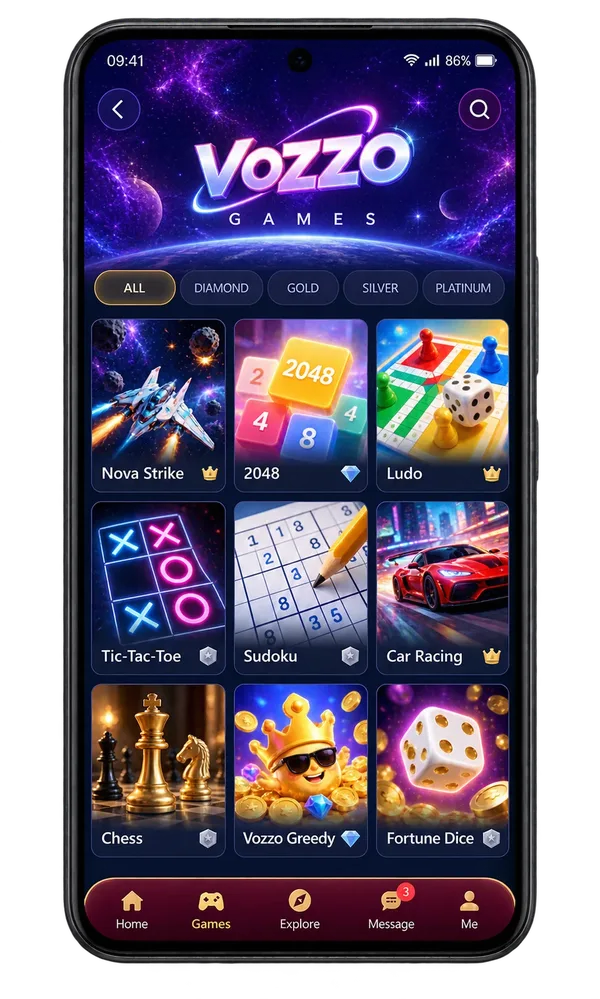
The Games collection
In-app game
Explore this quick-round game in the app.
In-app game
Open the game to review its current rules.
In-app game
Discover a different quick-round experience.
In-app game
Check the game details before your next round.
Action
Bring a little action to your game break.
Racing
Change the pace with a racing favourite.
Strategy
Take your time and plan the next move.
Puzzle
Combine numbers and think a few moves ahead.
Classic
A familiar classic for a quick break.
Puzzle
Find the pattern, one square at a time.
Board game
Settle into a board-game favourite.
Board game
Make room for a familiar table-game challenge.
Questions, answered
Use the game categories to find a quick puzzle, a board-game favourite or a change of pace. The selection includes Nova Strike, 2048, Ludo, Tic-Tac-Toe, Sudoku, Car Racing, Chess, Vozzo Greedy and Fortune Dice. The app shows the titles currently available. A game listing does not promise multiplayer features, prizes or a financial return.
The selected game opens through its launch screen, which shows the cover and loading progress before the player is ready. Give it a moment to load and follow the next action the app presents. This step connects discovery to play; an illustrated loading percentage is not a measure of the speed you should expect.
Play inside the Vozzo app once your selected game has loaded. Each game brings its own controls and rules: 2048, for example, is about combining number tiles and planning your next move. Check the selected game for available modes and conditions. The promotional website does not launch a browser version of the app's games.
Start with the time your friends have and the rules everyone understands. Plan a game session with friends, or browse the Vozzo game collection by mood and pace. Check each game’s supported modes before arranging multiplayer play.
Explore all live streaming guides for related topics.
Take your people with you
See the live video, messaging and community features, then check official app download details for your next step.
Get Vozzo