Platform comparisons · Comparison
A free alternative to Zoom, Google Meet and Teams
Zoom, Google Meet and Microsoft Teams are built for scheduled meetings. Vozzo is a social app built around live rooms, and a room can work as a free alternative for group calls: share your screen, lock the room with a password and welcome 1,000 viewers, with no time limit and all free of cost.

How Zoom, Google Meet and Teams work
Zoom, Google Meet and Microsoft Teams are video meeting services. A host starts or schedules a meeting and shares a link, and people join with video, audio, chat and screen sharing. Google Meet is part of Google Workspace, and Teams is part of Microsoft 365, where meetings sit next to team chat and files.
Their plans, time limits and participant limits change over time, so check each official site for the current details before you compare. They are a natural fit for work meetings, interviews and anything that runs on a calendar invite.
How a Vozzo room works as a meeting space
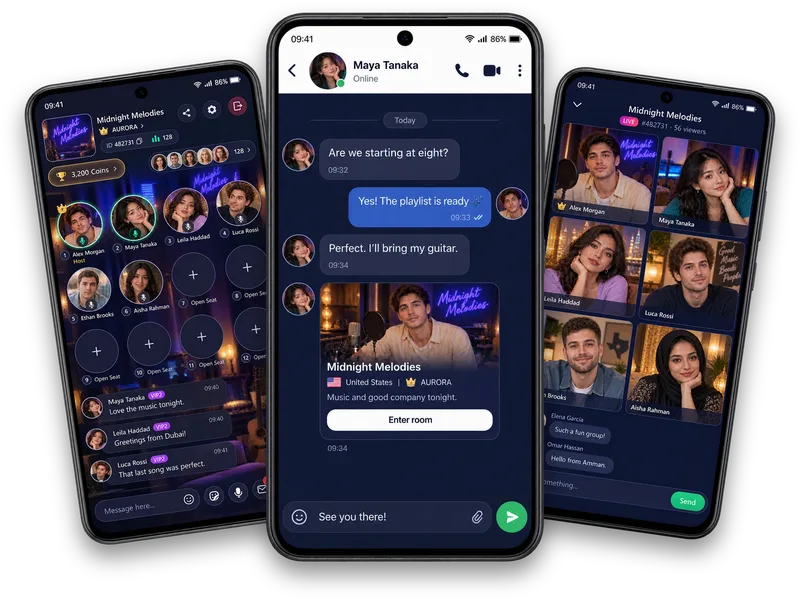
A Vozzo room has a host, speaker seats and a room chat. The host can share their screen with everyone in the room and lock the room with a password, so only invited people can enter. An Audio Room holds more than 1,000 listeners, and Party Live puts six people on camera with room for 1,000 viewers.
Rooms, screen sharing and one-to-one audio and video calls are free of cost, and rooms have no time limit: they stay open 24 hours a day, 7 days a week, 365 days a year. Vozzo is a mobile app for adults aged 18 and over, so everyone joins from their phone.
Which one fits your group
Choose Zoom, Google Meet or Microsoft Teams when your meeting depends on calendar invites, browser access or the tools your workplace already uses. Choose a Vozzo room when you want a free, phone-first space for a community meetup, a workshop, a fan club, a family call or a party, especially one with a large audience.
Many groups use both: a scheduled work call in one place and a relaxed community room in another.
Run your first free meeting room on Vozzo
Hosting a room has prerequisites, such as face authentication, so read how to start a live room first. Then give the room a clear name, lock it with a password and share the password only with the people you invite.
Open with the plan for the session, share your screen when you need to show something and use the room chat for questions. Keep personal details out of shared screens, and stop sharing as soon as you are done.
Check the official sources
Features, plans and limits change. Check Zoom, Google Meet and Microsoft Teams on their official sites for current features, prices and age rules. Safety tools differ too: look for blocking, reporting and privacy settings before you join any meeting.
Sources
Questions, answered
Is Vozzo a free Zoom alternative?
For group talks, workshops and community meetups, yes: Vozzo rooms offer screen sharing, password-protected rooms and room for 1,000 viewers, free of cost. For calendar-based work meetings, Zoom and similar tools may suit you better.
Is there a free alternative to Google Meet or Microsoft Teams?
Vozzo is a free option when the meeting suits a live room: share your screen, lock the room with a password and talk from the speaker seats while others listen and chat in the room.
Can I share my screen on Vozzo like on Zoom?
Yes. The host can share their screen with everyone in the room, and one-to-one audio calls also include screen sharing. Sharing starts only when you begin it.
Is there a free Zoom alternative with no time limit?
Yes. Vozzo rooms have no time limit: keep your room open 24 hours a day, 7 days a week, 365 days a year, free of cost. Zoom, Google Meet and Microsoft Teams set their own plan limits, so check their official sites for current details.
What if my meeting has a custom need?
Tell the Vozzo team what you need and we will provide it fully. Contact the team on WhatsApp or by email at support@vozzo.org; the contact details are on the free online meetings page.
Can I lock a Vozzo room with a password?
Yes. The host can lock the room and set a password, so only people who have the password can enter.
Written by the Vozzo editorial team. Spotted a mistake or want to suggest a correction? Email support@vozzo.org.
Keep reading
Platform comparisons · Comparison
Live voice rooms vs Discord voice channels
Both let people talk by voice. They are built for different situations: one is organised around servers people set up, the other around rooms you can drop into.
Popular questions · Hosting
How to start a live room on Vozzo
Starting a live room takes two steps: create the room, then choose how to go live. Whether you want to host a live broadcast on video or a relaxed Audio Room, some preparation comes first, because hosting has requirements.