Discover · Live rooms
Welcome listeners to your first audio room.
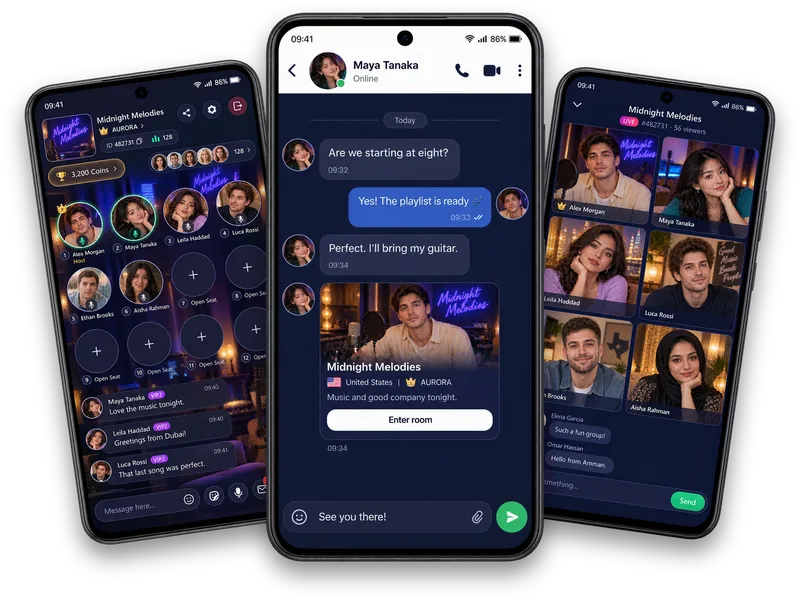
Welcome new audio-room listeners with a clear topic, a short introduction and an easy question. Check your sound, explain how to join in and leave people free to listen before speaking.
Bring one easy opening question.
Pick a topic people can answer without a long introduction: a song they keep replaying, a highlight from their day or a place they would like to visit.
When someone joins, briefly explain the topic. A simple welcome helps them follow the conversation without feeling pressured to speak.
Make listening part of the room.
Allow time for answers and let one person finish before moving on. Notice contributions in room chat as well as the people on audio seats.
Invite people into the topic without putting them on the spot. Someone who prefers listening is still part of the room. Set a respectful tone if the discussion starts to get uncomfortable.
Keep the sound and the pace comfortable.
Check your sound before you start. If you use music broadcasting, choose music you have permission to share and keep the conversation easy to hear.
Close with a thank-you and let connections continue through following or messages when people want to stay in touch. Review host programme terms separately before making commitments about activity or earnings.
Want to hear how it sounds? Browse live audio rooms and voice chat rooms on Vozzo.
Written by the Vozzo editorial team. Spotted a mistake or want to suggest a correction? Email support@vozzo.org.
Keep reading

Discover · Games
Vozzo games: puzzles, board games and quick rounds.
Choose a casual game that fits your time and interests, from Chess and Ludo to Sudoku, 2048 and action games. Review the current rules and access details for each title before playing.

Discover · Moments
What to post in Moments and Shorts.
Share a thought, tag a friend or pair a photo with a caption in Moments. Choose video when movement or sound tells the story, and upload it to Shorts. Start with something you enjoy and have permission to share.