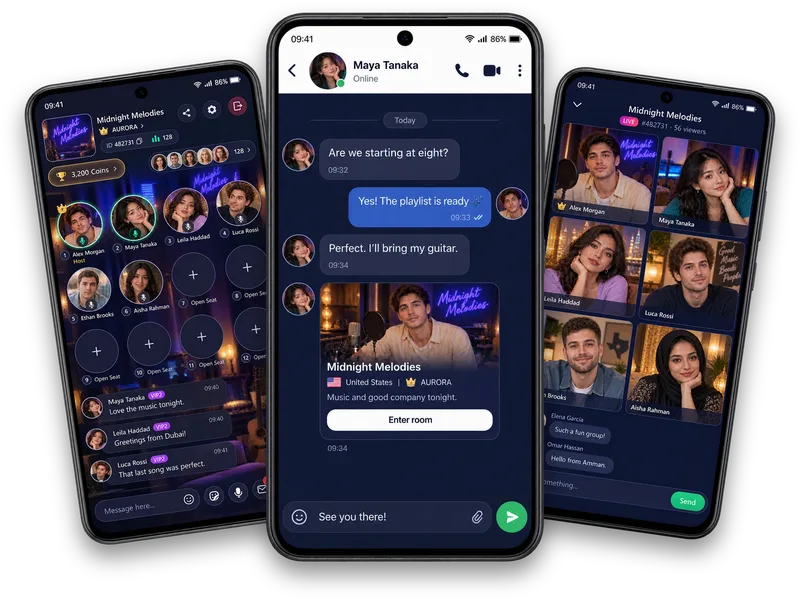
Make your introduction yours
Choose a cover, portrait, nickname and introduction through Edit profile. Read which onboarding details stay locked.
More than a name in a room
Build your Vozzo profile with a cover, introduction, shared Moments and social connections. Explore followers, supporters, Family and relationship cards, plus the levels and medals that express your progress.
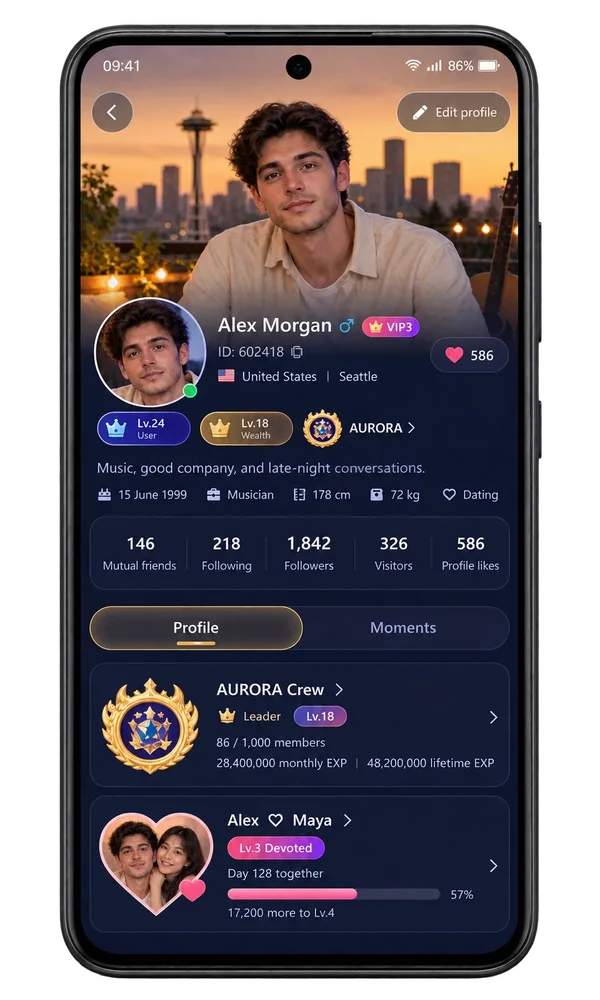
Your profile
Choose a cover, portrait, nickname and introduction through Edit profile. Read which onboarding details stay locked.
Explore followers, following, profile likes and the connection actions available when you visit another profile.
Find shared Moments, Top Supporters, User and Wealth levels, rankings and your Medal Wall, each with its own meaning.
Make it your experience
Your profile brings together self-expression, Family and relationship information. Choose what you share, respect other people's boundaries and use the account and privacy controls that apply to you.
Celebrate Couple (CP), Soulmate, Bestie and Homie through relationship cards, level artwork and certificates. CP also has its own shared space and level-based privileges.
Explore love and friendshipQuestions, answered
Me brings your Vozzo essentials together: your identity, Contributed, Following, Followers and Visitors, plus Coins, VIP, My Center and More. Open your profile to introduce yourself or follow the Recharge banner to the Coin packages in the app. It is a convenient starting point for your social life, personal features and account information.
Give people more than a name to remember. My Profile combines your cover, portrait, introduction, identity badges, social connections, Family and relationship information, with Profile and Moments views. Use Edit profile to update the details you can change. What a visitor sees follows your profile settings and the connection between your accounts.
Your profile has a Moments view so people can catch up on the posts you share. Your photos, words and everyday interests give the next conversation somewhere to begin. The view uses the app's normal posting and engagement controls; it is part of your in-app profile, rather than a public social feed hosted on this website.
Refresh your cover or profile photo, choose a nickname and write an introduction that sounds like you. Edit profile shows the personal details you can change and checks them when you save. Information locked during onboarding stays subject to those limits. Share enough to express your interests while keeping sensitive personal information private.
Discover the interests and social context behind someone you meet in a room or a feed. A profile can bring together identity, shared Moments, room, Family and relationship information. Follow, friendship and messaging actions depend on your connection and account settings. Respect what a person chooses to share and their choice about continuing a conversation.
Open your social lists to see the people you follow and the people following you. The app shows the appropriate action for your connection, such as Follow back or Following. These lists help you reconnect with familiar faces after a good room or conversation. Follow changes happen in your signed-in app account.
Profile Likes brings together the accounts engaging with your profile, with their identity details and the follow actions available to you. It is another way to discover people who notice your presence. The names and counts in website illustrations are examples, rather than live activity or evidence of a particular audience size.
Recognise the people who have shown appreciation through gifts. Top Supporters is an all-time top-ten view, with a podium and supporter rows. It is separate from rankings with selectable periods. Gift values use virtual Coins; a place on the supporter list does not represent cash, an investment or a withdrawal balance.
Explore the Ranking and Couple Ranking boards, select the available period and use the Host, Rich or Gift categories where shown. Rankings reflect a particular board and period; User and Wealth levels describe separate account progress. Ranking periods follow UTC boundaries, and a position on a board is not an earnings forecast.
Follow your own progress through the level page. User levels use User EXP, while Wealth progress follows its qualifying activity and thresholds. Daily activity panels and the upgrade explanation help you understand the next step. These lasting account levels are separate from period rankings, relationship levels and the grade or validity of a membership.
Explore the medals represented on your profile and see which milestones are earned or still locked. The Medal Wall gives recognition a place in your identity without turning it into a financial reward. A decoration shown in a website illustration introduces the feature; it does not prove that a real account earned that medal.
Give your profile a personal touch with avatar frames and profile customisation, share Moments posts and Shorts videos, and explore Couple and friendship cards.
Explore all live streaming guides for related topics.
Take your people with you
See the live video, messaging and community features, then check official app download details for your next step.
Get Vozzo